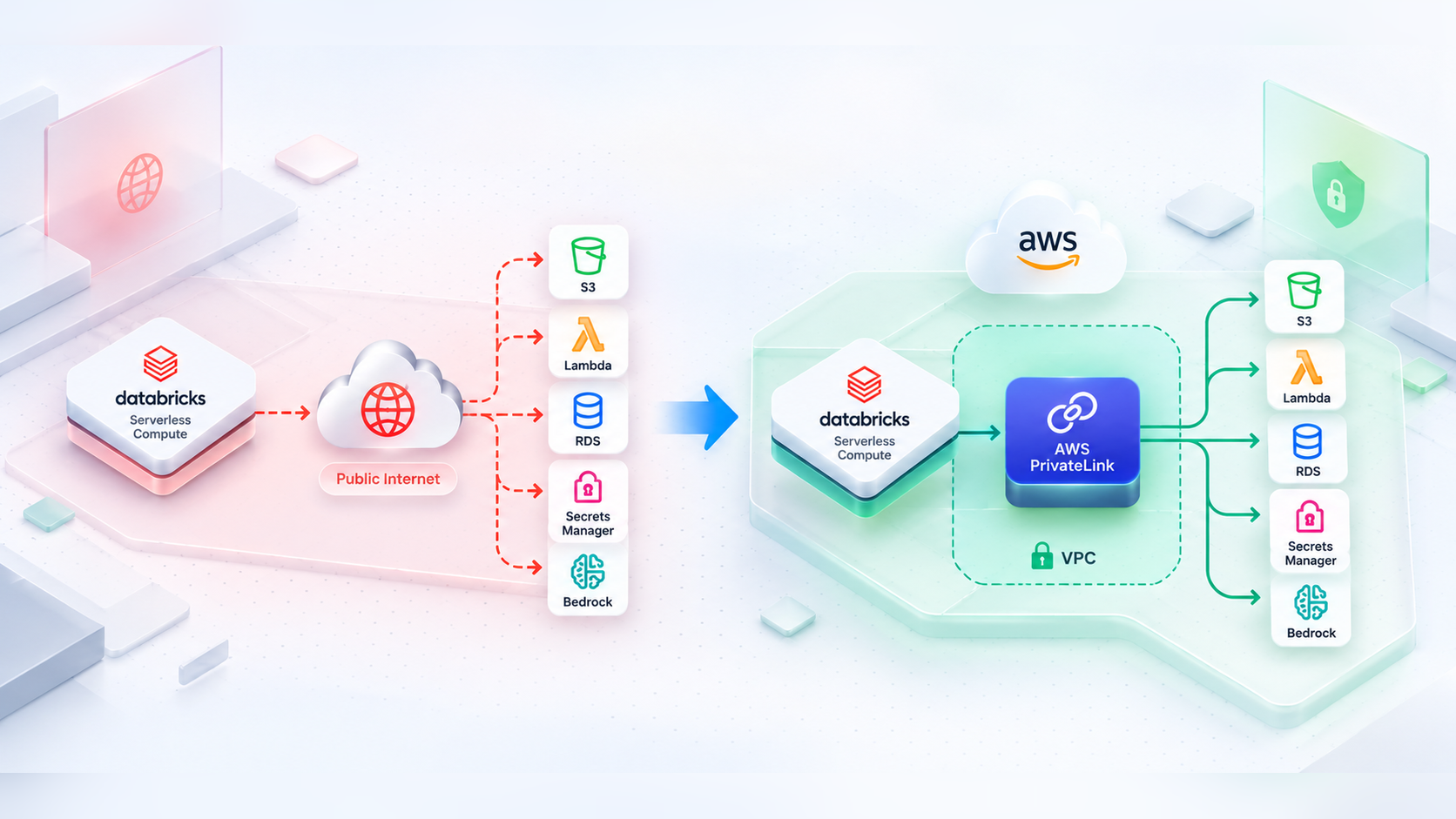
- On October 12, 2026, Databricks made AWS PrivateLink from serverless compute to AWS-managed resources generally available (GA), closing a major architectural gap in regulated enterprise cloud deployments.
- Previously, serverless compute required maintaining fragile, rotating public IP allow-lists across bucket policies, firewalls, and database access controls.
- With GA, traffic stays entirely on the AWS private network backbone. Databricks manages the interface endpoint via Network Connectivity Configurations (NCC), while you enforce explicit deny policies against the VPC endpoint ID.
- Supported services extend far beyond S3—including DynamoDB, Glue, Bedrock, KMS, Secrets Manager, RDS Data API, Redshift Data API, Lambda, SNS, and SQS.
- Following a strict deployment order (provision NCC → craft explicit Deny resource policies → enable rule → attach workspace) avoids production lock-out.
“Serverless is blocked until we can show that data never touches the public internet.”
On October 12, 2026, Databricks made private connectivity from serverless compute to AWS-managed resources generally available, and it closed a gap that cost our team weeks of security-review back-and-forth.
1. The Friday the Security Review Said No
It was a Friday afternoon when the message landed in our team channel: “Serverless is blocked until we can show that data never touches the public internet.”
We had just spent a month moving our pipelines from classic clusters to serverless compute. Start-up times dropped from minutes to seconds. Nobody was babysitting cluster policies anymore. Our analysts were happy, and our platform team had finally stopped getting paged about autoscaling.
Then our security team reviewed the network diagram. On the classic side, the picture was reassuring: our own VPC, our own subnets, S3 gateway endpoints, and interface endpoints for Secrets Manager and KMS. Every arrow stayed inside AWS and inside our account boundary. On the serverless side, there was a box labelled “Databricks serverless compute plane” and an arrow to our S3 buckets that left the box and went somewhere we could not draw.
That arrow was the problem. We could not point at a VPC endpoint of our own on it, because the compute no longer lived in our VPC. We could write bucket policies, but they had to describe the caller by its public identity, and a public identity is exactly what a regulated workload does not want to depend on.
So we did what most teams do. We got it to work, documented the exceptions, and promised to revisit it. The rest of this post is about what “got it to work” really cost us, and why the October 2026 GA release lets us delete most of that work.
2. What “Got It to Work” Really Cost Us
Our workaround was an allow-list. For buckets in the workspace’s region, the firewall guide has you add a condition on the Databricks serverless OrgPath to the bucket policy. For everything else, such as Secrets Manager or a database firewall, you allow the outbound IPv4 ranges Databricks publishes in a JSON file, and you have to refresh them because the file can change as often as every 30 days.
A resource policy built on those ranges looked roughly like this (ranges shown are documentation placeholders, not real ones):
{
  "Version": "2012-10-17",
  "Statement": [
    {
      "Sid": "DenyUnlessKnownPublicSources",
      "Effect": "Deny",
      "Principal": "*",
      "Action": "secretsmanager:GetSecretValue",
      "Resource": "*",
      "Condition": {
        "NotIpAddress": {
          "aws:SourceIp": [
            "203.0.113.0/28",
            "198.51.100.0/27",
            "192.0.2.10/32"
          ]
        }
      }
    }
  ]
}
It worked. It also hurt in ways that took us a few months to fully appreciate:
An IP allow-list says “traffic from these addresses is fine”. It does not say “traffic that stayed on the AWS network”. Our auditors wanted the second statement and we could only offer the first.
The same list lived in every bucket policy and in the firewall rules in front of our databases. Each new workspace or region meant a change request touching many places, and the lists drifted.
Our serverless jobs also called Secrets Manager, KMS, DynamoDB and, later, Bedrock. Each of those was a public AWS endpoint we had to reason about separately, and none had the neat bucket-level story built for S3.
Unity Catalog and network policies gave us strong controls, but “strong controls on a public path” is a harder sentence to defend than “there is no public path”.
Every exception was a meeting. Each quarter, someone had to re-justify the allow-list to security. That is a recurring cost no dashboard shows. We were not unhappy with serverless. We were unhappy that our network diagram had a cloud-shaped hole in it.
3. What GA Changes: PrivateLink Architecture
The feature is AWS PrivateLink from Databricks serverless compute to AWS-managed resources, such as S3 buckets. It was in Public Preview and became generally available on October 12, 2026. Traffic stays inside the AWS network and never crosses the public internet.
The mechanics are simple:
- Create a Network Connectivity Configuration (NCC) in your Databricks account.
- Add a private endpoint rule for the target AWS service.
- Lock the AWS resource down to the resulting VPC endpoint ID (
aws:SourceVpce). - Enable the rule, and attach the NCC to your workspaces.
Databricks creates and manages the interface endpoint in their compute plane; you decide what is allowed through it in your AWS account.
4. Supported Services & Scoping Rules
The list of supported services is what made this interesting for us, because it covers far more than S3:
| Area | Supported Resources |
|---|---|
| Storage & Data | S3 (same or cross-region), S3 FIPS (same region), DynamoDB, Glue |
| Databases & Analytics | RDS, RDS Data API, RDS Performance Insights, Redshift, Redshift Data API, Redshift Serverless, EMR |
| Generative AI | Bedrock, Bedrock Agent, Bedrock Agent Runtime, Bedrock Runtime |
| Security & Identity | KMS, Secrets Manager, STS |
| Compute & Messaging | Lambda, SNS, SQS |
S3 supports per-bucket scoping, with up to 100 bucket names per rule.
For every other service, the endpoint applies to all traffic from the attached workspaces to that service type; there is no per-instance scoping. Plan your IAM resource policies with that in mind.
5. Setting It Up, in the Order That Avoids a Lock-out
The Databricks guide walks through the account console. The order matters more than any single step, so here is how we ran it.
Step 1: Create the NCC and the Private Endpoint Rule
In the account console, open Security, then Network connectivity configurations, and add a configuration in the same region as your workspace. Under Private endpoint rules, add a rule, pick the resource type (for example S3 bucket) and, for S3, list the bucket names.
If you manage the account with code, the equivalent in Terraform looks like the sketch below. The GA page documents the console flow only, so check the field names against the current provider docs before you rely on it:
resource "databricks_mws_network_connectivity_config" "serverless" {
  provider = databricks.account
  name     = "serverless-private-us-east-1"
  region   = "us-east-1"
}

resource "databricks_mws_ncc_private_endpoint_rule" "finance_lake_s3" {
  provider                       = databricks.account
  network_connectivity_config_id = databricks_mws_network_connectivity_config.serverless.network_connectivity_config_id
  endpoint_service               = "com.amazonaws.us-east-1.s3"
  resource_names                 = ["acme-finance-lake"]
}

resource "databricks_mws_ncc_binding" "prod" {
  provider                       = databricks.account
  network_connectivity_config_id = databricks_mws_network_connectivity_config.serverless.network_connectivity_config_id
  workspace_id                   = var.prod_workspace_id
}
The rule is created in a disabled state by default. Treat that as a feature: it gives you time to configure and test the resource policies first without cutting off live jobs.
6. Step 2: Lock the Resource to the VPC Endpoint
This is the step that replaces our old IP allow-list. The pattern is an explicit Deny for anything that does not come from the endpoint.
For S3, the bucket policy also has to let the Databricks control plane in, because Unity Catalog reaches the bucket from there. The IfExists operators mean a request passes if it matches any one approved source:
{
  "Version": "2012-10-17",
  "Statement": [
    {
      "Sid": "DenyAllOtherAccess",
      "Effect": "Deny",
      "Principal": "*",
      "Action": "s3:*",
      "Resource": [
        "arn:aws:s3:::acme-finance-lake",
        "arn:aws:s3:::acme-finance-lake/*"
      ],
      "Condition": {
        "StringNotEqualsIfExists": {
          "aws:SourceVpce": "vpce-0abc1234567890def",
          "aws:SourceVpc": [
            "vpc-11111111",
            "vpc-22222222"
          ]
        },
        "NotIpAddressIfExists": {
          "aws:SourceIp": [
            "203.0.113.0/28"
          ]
        }
      }
    }
  ]
}
Here vpce-0abc... is the endpoint Databricks created, vpc-11111111 and vpc-22222222 stand in for the control plane VPC IDs of your region (the docs link to the published list), and the IP range is your corporate VPN.
DynamoDB Resource Policy Pattern
Services with their own resource policies, such as DynamoDB, take the same idea in a simpler form:
{
  "Version": "2012-10-17",
  "Statement": [
    {
      "Sid": "DenyAccessOutsideVpcEndpoint",
      "Effect": "Deny",
      "Principal": "*",
      "Action": "dynamodb:*",
      "Resource": "arn:aws:dynamodb:us-east-1:111122223333:table/orders",
      "Condition": {
        "StringNotEquals": {
          "aws:SourceVpce": "vpce-0abc1234567890def"
        }
      }
    }
  ]
}
IAM Role Inline Deny (Bedrock, RDS APIs, Redshift APIs, EMR, STS)
For Bedrock, RDS APIs, Redshift APIs, EMR, and STS there is no resource policy to attach to. Instead, you add an inline Deny to the IAM role that the service credential uses:
{
  "Version": "2012-10-17",
  "Statement": [
    {
      "Sid": "DenyAccessOutsideVpcEndpoint",
      "Effect": "Deny",
      "Action": "*",
      "Resource": "*",
      "Condition": {
        "StringNotEquals": {
          "aws:SourceVpce": "vpce-0abc1234567890def"
        }
      }
    }
  ]
}
7. Step 3 & 4: Enable Rule & Prove Connectivity
Step 3: Enable the Rule and Attach the NCC
Only now do you open the rule’s menu, choose Update rule, and select Enable rule. From this moment, traffic for that service from every workspace attached to the NCC goes through PrivateLink. Then attach the NCC under Workspaces > Update Workspace > Network connectivity configurations.
Step 4: Prove It
For S3, we registered the bucket as an external location and created a table there. The first attempt can take up to ten minutes while the private connection establishes:
CREATE TABLE finance.raw.test_connectivity
LOCATION 's3://acme-finance-lake/test_connectivity';
For a service like Secrets Manager, call it from a serverless notebook and check the service’s own access logs for the endpoint ID. We use a Unity Catalog service credential so no keys are involved:
import boto3

session = boto3.Session(
    botocore_session=dbutils.credentials.getServiceCredentialsProvider("prod-aws-access"),
    region_name="us-east-1",
)
secrets = session.client("secretsmanager")
resp = secrets.get_secret_value(SecretId="prod/payments/api-key")
print("secret fetched, version:", resp["VersionId"])
And for anything you cannot register as an external location, a DNS lookup from a notebook should come back with a private IP:
%sh nslookup secretsmanager.us-east-1.amazonaws.com8. Gotchas We Hit (Or Nearly Hit)
It blocks every request without a matching source, including the AWS console, the CLI, and your own administrators. Add admin roles and VPN ranges before you enable the rule. Because the rule starts disabled, you have time to get this right.
Access must use {bucket}.s3.{region}.amazonaws.com, or the S3 FIPS variant. Legacy global names like {bucket}.s3.amazonaws.com are not supported, so grep code and configs for them before switching.
If your serverless network policy restricts external access, remember to add the regional bucket domain to your allowed domains list.
Use it if your workspace requires FIPS endpoints, including FedRAMP Moderate and High environments. The endpoint service must reside in the same region as the NCC.
The endpoints cover each service’s API, including the RDS and Redshift Data APIs. Direct JDBC or ODBC connections to instances use separate DNS names and are not part of this feature.
Each account gets up to 20 NCCs per region; each region allows 30 private endpoints; one NCC attaches to up to 50 workspaces; and an S3 rule holds up to 100 bucket names. S3 allows one private endpoint rule per NCC per region.
You need the Enterprise plan and an account admin. Databricks charges for networking when serverless workloads connect to your resources, so review the networking cost page before broad rollout. Also, give the first connection around 10 minutes to initialize.
9. Was It Worth It?
The next security review took one slide.
The old diagram had an arrow that left the box and went somewhere we could not draw. The new one has an arrow from serverless compute to a VPC endpoint to the service, and every policy says the same thing: deny anything that does not come through that endpoint.
We deleted most of our IP allow-lists, we stopped re-justifying exceptions every quarter, and we extended the same pattern to Secrets Manager and KMS instead of treating them as special cases. Serverless stopped being the compute we had to defend and became compute that fits the story we already tell about the rest of our platform.
If you are in the same position, start with one bucket, write the Deny policy before you enable the rule, and prove it with a table creation and a DNS lookup. The hard part is not the setup. It is the discipline of getting the policies right first.
10. Sources & Official Documentation
Reference materials and official Databricks guidance for configuring serverless network security on AWS:
Hardening Your Cloud Data Platform?
Abilytics helps enterprise engineering teams architect secure, compliant lakehouses, automated PrivateLink endpoints, and zero-trust cloud infrastructure.